Freeware HTI PDF Creator 4.0

Author: mr.dimo /

Freeware HTI PDF Creator

Create PDF using HTIPDF - a free tool for high-quality conversion to PDF, comprising a user-friendly interface that enables printing to PDF from virtually any

Windows application. Additionally, HTIPDF provides the ability to optimize PDF output for SMALLEST and secure PDF files with 128-bit encryption, and add document information (e.g. title, author, subject, keywords) to converted PDF files. Support Vista operating system perfectly.
Support email after creating PDF.

Download Freeware HTI PDF Creator 4.0

CleanMyPC Registry Cleaner 4.21

Author: mr.dimo /

CleanMyPC Registry Cleaner

CleanMyPC Registry Cleaner will scan the Windows registry and find incorrect or obsolete information in the system registry.

By fixing these obsolete information in Windows registry, your system will run faster and error free. The backup/restore function of the tool let you backup your whole Windows Registry so you can use it to restore the registry to the current status in case you encounter some system failure.

CleanMyPC checks the integrity of every section of your Windows registry, from application path keys and Windows font keys, to ActiveX keys and shared DLL keys. CleanMyPC Registry Cleaner fixes all of these problems, and makes your computer faster and more stable.

CleanMyPC Registry Cleaner defragments the registry after it removes unnecessary data, allowing your computer to run faster, and enhancing its stability.

Besides above, the startup and BHO organizer feature let you manage your startup and IE BHO items with ease, and you can control the programs started with Windows and IE more handy with this feature!

Overall, this software will help you get rid of the bloat in Windows registry, thus achieving a cleaner, faster system.

The privacy eraser feature let you protects your online privacy. Windows keeps track of your web browser’s URL history, cookies, cache files, typed URLs, autocomplete list, and saved user names and passwords.

CleanMyPC erases this information, and keep other family members or business colleagues from examining your Internet activities.

Whether you’re a business person who wants to keep your computer stable and brisk, a home user who needs to be able to restore your computer after your kids load a computer game that causes crashes, or a student who wants to keep other kids from discovering what Internet resources have been accessed, CleanMyPC Registry Cleaner has the tools that you need.

Download CleanMyPC Registry Cleaner 4.21

Backup4all Professional 4.1 Build 136

Author: mr.dimo /

Backup4all Professional
Backup4all is an award-winning backup application for Windows.The application was designed to protect your valuable data from partial or total loss by automating backup tasks, password protecting and compressing it to save storage space.

The application is feature rich and offers an intuitive interface making all features easily accessible for both beginners and professionals.

The application can perform all four backup types: full, incremental, differential and mirror. Using the wizard you can easily set up any backup configuration you wish.

You can define powerful file filters and schedule your backups any way you want. Once a backup is performed, you can see what files changed since the last backup using the explorer-like tree view or you can read the statistics about the next backup execution.

You can use the context menu from the tree to run standard actions associated with the file type.

Backup4all creates standard zip files. This means that your data is not at the mercy of the utility itself; you can access it with any zip compatible utility.

Backups larger than 2GB will be automatically split into more individual zip files, making them compatible with both WinZip and PKZip.

Backup4all can perform incremental backup to keep track of file versions. You can easily restore any version of files or a whole folder. You can filter files to be restored.

Backup4all works with any drive letter, including mapped network drives and UNC paths. The application comes with its own built-in CD burning support.

Just set the destination on CD and execute the backup item. However, if you prefer, you can use UDF format (using products such as DirectCD or InCD).

Download Backup4all Professional 4.1 Build 136

ImTOO FLV Converter 5.1.23.0424

Author: mr.dimo /

ImTOO FLV Converter

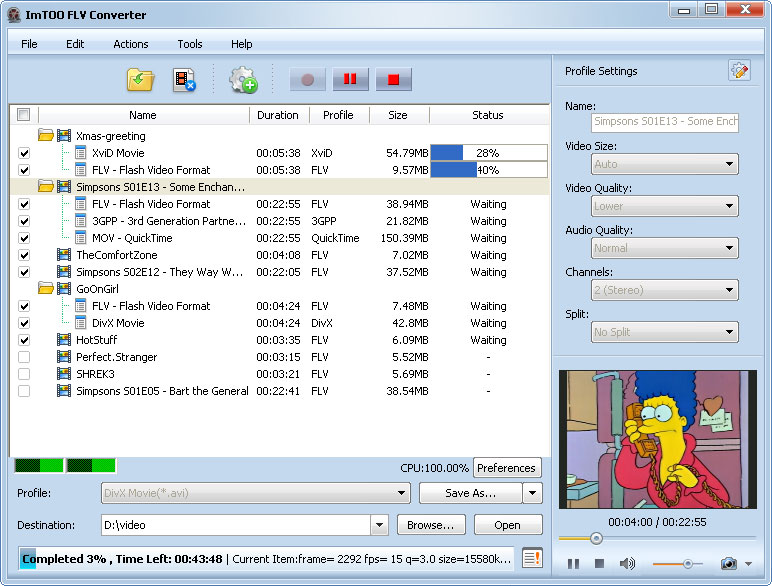
ImTOO FLV Converter is professional FLV video converter and SWF converter tool, which can easily convert MPEG to FLV, AVI to FLV, WMV to FLV video, AVI to SWF format.

In addition, ImTOO FLV Converter helps convert FLV file and convert SWF file from audio files. So don’t hesitate to donwload ImTOO FLV Converter free to convert AVI to FLV, MPEG to FLV, and WMV to FLV!

ImTOO FLV Converter is a powerful and easy-to-use video to FLV/SWF converter. It can convert all popular video formats like DivX, XviD, WMV, 3GP, MPEG, MP4, M4V, ASF, RM, RMVB, MOV, VOB, AVI to FLV video and SWF formats.

ImTOO FLV Converter can also convert audio formats to Flash Video (FLV and SWF) formats that audio alone. It helps convert FLV file from all types of audio file, such as MP2, MP3, M4A, AC3, AAC, RA, WMA, OGG, APE, CUE and audio CD.

With very simple settings, the software convert FLV file super easily and fast! Own this software to get a perfect and professional FLV or SWF Flash files for the internet!

Key Functions of “ImTOO FLV Converter”:

■ FLV Video Converter
ImTOO FLV Converter is powerful MPEG to FLV and AVI to FLV converter software. The FLV video converter can convert FLV file from various video files such as DivX, Xvid, WMV, 3GP, MPEG, MP4, M4V, ASF, RM, RMVB, MOV, VOB, AVI, etc.
■ SWF Converter
It is not an video to FLV converter only, but an SWF converter either, which can also convert to SWF movie files for the web publishing and streaming.
■ Flash Audio Converter
ImTOO FLV Converter is also an audio to Flash converter, that can convert MP2, M4A, AC3, AAC, RA, WMA, OGG, APE, CUE, audio CD, MP3 to FLV file, and MP3 to SWF file.
Download ImTOO FLV Converter 5.1.23.0424

Xilisoft FLV Converter 5.1.23.0417

Author: mr.dimo /

Xilisoft FLV Converter

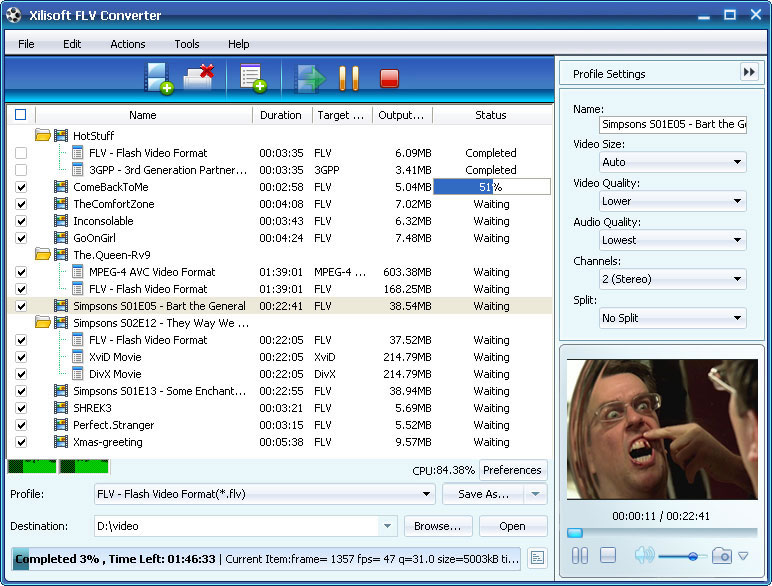
Xilisoft FLV Converter is a powerful and easy-to-use FLV conversion application.

Xilisoft FLV Converter can convert all popular video formats such as DivX, XviD, WMV, 3GP, AVI, MP4, M4V, ASF, RM, RMVB, MOV, VOB and MPEG to FLV video format.

Xilisoft FLV Converter can also convert all popular audio formats, including MP2, MP3, M4A, AC3, AAC, RA, WMA, OGG, APE, CUE etc to FLV audio files.

Here are some key features of “Xilisoft FLV Converter”:

· supports multithreading and batch conversion. You can select all files you want to convert and Xilisoft FLV Converter will automatically encode them one by one even if these files use different settings;
· supports multi-language, such as, English, Chinese, and Japanese, German and Persian. You can choose what language you like to use the software;
· Supports preview. Users can choose to preview the input files before conversion;
· Super fast speed and excellent output quality are provided;
· Encoders and decoders are built-in. The software integrates with all video/audio encoders/codec. Users can convert all supported formats once download the program.
· Auto-detects your CPU. The ripping will be done at the best converting speed;
· Video Bit rate, Audio Bit rate, Frame rate, Video Size, Duration, and other parameters can be set before conversion;
· Xilisoft FLV Converter provides two modes: the Wizard Mode guiding the whole conversion process for you while the Advanced Mode with variable settings that you can set at will.

Download Xilisoft FLV Converter 5.1.23.0417

QuuxPlayer Standard Edition 2.6.3.5

Author: mr.dimo /

QuuxPlayer Standard Edition

QUUXPLAYER: PC MUSIC MADE EASY

Ever wonder why Windows music players seem to be designed for everything except actually listening to music?


A DIFFERENT APPROACH

Does your Windows music player make it easy to sit back, relax, and really listen to your music? Or does it distract you with unnecessary complexity?

NO SKINS. NO PLUG-INS. NOTHING STANDING BETWEEN YOU AND YOUR MUSIC

Now there’s a Windows audio player that is designed to make the important part of all of music ? the listening experience ? a pleasure instead of an afterthought. You can get to the music you want to hear quickly and easily, even with libraries of 100,000 tracks or more. All with outstanding sound quality. And without unnecessary stuff like skins, add-ons, on-line stores, limited formats, and marketing gimmicks that compromise the listening experience. QuuxPlayer is simple enough to get started right away, but when you’re ready it will support you with a rich set of features like advanced automatic playlist rules and a 30 band equalizer.

GET THE STANDARD EDITION FOR FREE!

You’ll find plenty to like about QuuxPlayer. It’s the easiest to use Windows audio player you can find, delivers outstanding sound quality and performance, and has some of the best features around. Give it a try!
Download QuuxPlayer Standard Edition 2.6.3.5

MediaCoder 0.7.0 Build 4385

Author: mr.dimo /

MediaCoder

video side, MEncoder can be used as back-end, which will provide support for nearly all known video compression and container formats as well as rich and useful video filtering features (e.g. 3D de-noise, post-processing).

On audio side, MPlayer and Winamp input plugins used as decoders, various encoders integrated, MediaCoder can simply batch transcode among any known audio formats, with tags transferred, file names generated, and even performing audio filtering (e.g. resample, normalize) on the fly.

Here are some key features of “MediaCoder”:

Typical applications:
· Improving compression / reducing file size (audio+video -> audio+video)
· e.g. MPG/VOB/AVI/RMVB/MOV/MP4 -> AVI/MKV (Matroska)/MP4 (Xvid/DivX/H.264 + MP3/OGG/AAC)
· Extracting audio track (audio+video -> audio)
· e.g. MPG/VOB/AVI/RMVB/MOV/MP4 -> MP3/OGG/AAC/MPC
· Converting to normal VCD/DVD player ready video files (audio+video -> MPEG)
· e.g. RMVB/MOV -> MPEG 1/2
· Converting from lossless or high-bitrate audio to low-bitrate audio to play with portable DAP (audio -> audio)
· e.g. APE/FLAC/WavPack (+ CUE sheets) -> MP3/AAC/WMA
· Ripping CDs and compressing it on the fly

Download MediaCoder 0.7.0 Build 4385